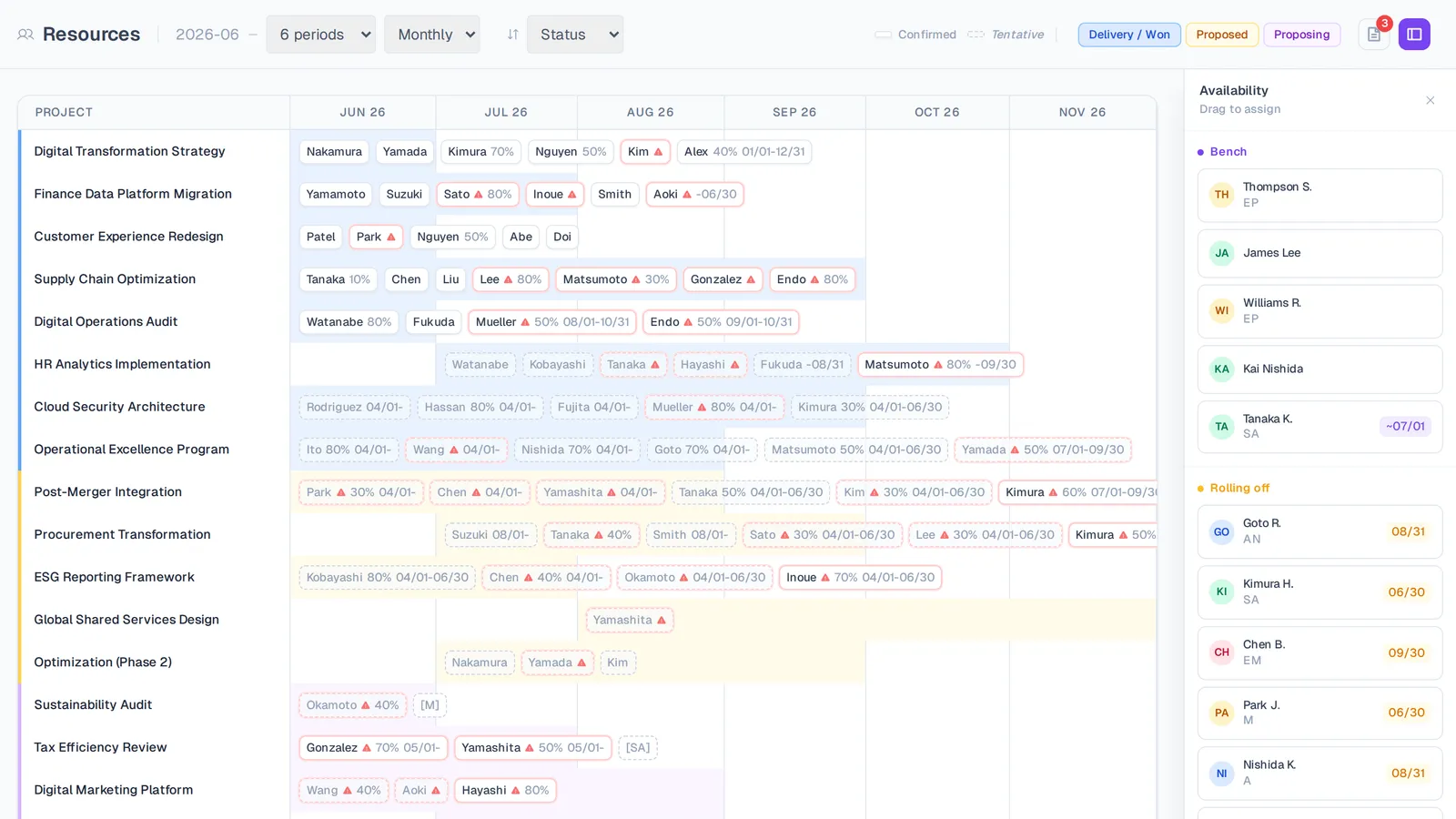
A live read on who's free, who's full, and who frees up next — across the whole firm.
Capacity you can trust
Bench and roll-off radar
See who's available now and who frees up next, firm-wide, without chasing project managers for updates.
Accurate to each person's hours
Capacity comes from each person's work profile — full-time, part-time, or contract — so utilization never lies.
Over-allocation, flagged
Anyone past 100% is highlighted, with a per-project breakdown the moment you hover the cell.
Time off, handled your way
Count PTO as reduced capacity or as utilized time — your call, set once per workspace.
The bench, in real time
See who's available now and who rolls off soon, without pinging a single project manager. Availability is computed from live assignments, so the picture is never a week out of date.
- Bench and roll-off in one view
- Filter by capability or team
- Always current — no manual refresh
Bench & roll-off
Honest utilization
Capacity comes from each person's real working hours — full-time, part-time, or contract — and time off is handled the way your firm counts it. Hover any cell to see exactly where someone's hours are going.
- Per-person work profiles, not a flat 40 hours
- PTO as reduced capacity or as utilized time
- Per-project breakdown on hover
Utilization breakdown
See it on your own projects.
Start free, or book a guided walkthrough on your own data.